
Modules Overview
AI-assisted School ERP modules, organized around how schools actually work.
Explore Eduforge modules - from AI assistant, WhatsApp inbox, OTP/PIN access, and guided onboarding to fees, attendance, exams, reports, parent portal, and mobile access. Grouped by how schools actually use them.
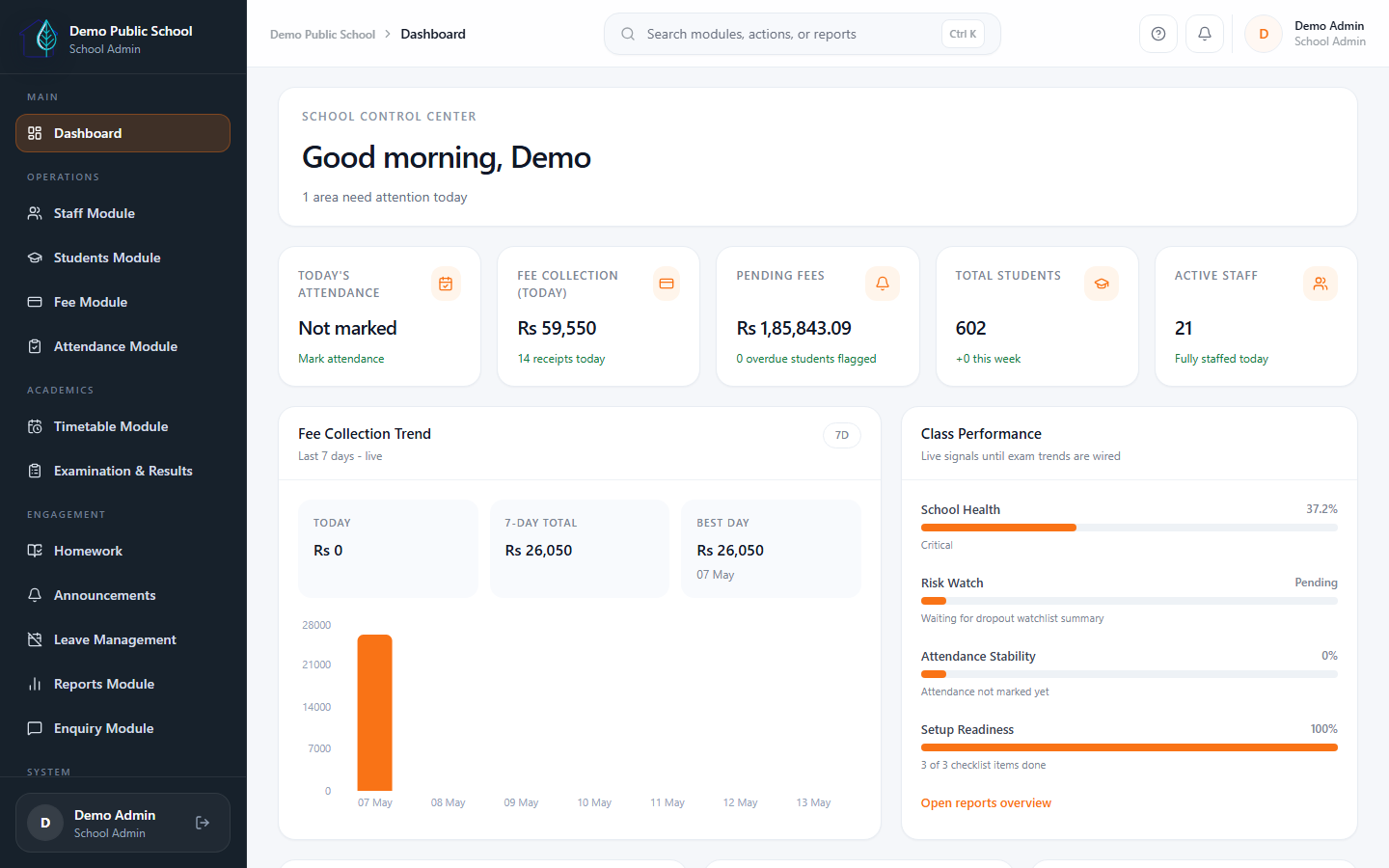
Core Operations
The core modules schools use most often.
These are the modules most schools start with during their ERP rollout.
Fee Management
Collections, receipts, dues, discounts, installments, and fee visibility from one connected workflow.
Attendance
Daily class attendance with overview, marking, same-day review, and monthly tracking.
Exam & Report Card
Exam scheduling, marks, result release, promotion, and report-card workflows enabled by plan and onboarding scope.
Parent Portal
Mobile-friendly parent access for fees, attendance, notices, homework, results, and receipts.
AI & Smart Insights
AI Assistant, smart import column mapping, fee risk, dropout risk, attendance anomaly insights, role access, and school-level AI controls.
WhatsApp & Communication
WhatsApp inbox, templates, parent communication, fee reminders, homework and announcement notifications, email logs, and provider charge clarity.
Extended Modules
The modules schools add as operational depth increases.
Schools add these modules as operations grow and more workflows need digital support.
Transport
Routes, assignments, bus attendance, billing status, and transport-linked fee workflows.
Homework
Teacher assignment flow, parent acknowledgment, attachments, and class communication continuity.
Academic Engagement
Homework, attachments, parent acknowledgement, syllabus progress, exam schedules, marks, and report cards, with study material and quizzes as roadmap where needed.
Admission
Enquiries, follow-up visibility, timeline notes, and conversion support into student admission.
Staff Management
Organized staff records, operational visibility, and day-to-day school team administration.
Reports
Leadership-ready operational summaries for fees, academics, attendance, and school decision support.
Organized ERP catalog
A clearer view of what Eduforge actually covers.
Modules are grouped by school workflow. AI Assistant, WhatsApp inbox, OTP/PIN access, notification settings, and insights are Eduforge strengths; some operational modules still depend on plan, add-ons, and rollout scope.
Setup and rollout
Guided Onboarding
Launch center, imports, review, go-live readiness, and guarded post-live import support.
Roles and Permissions
Role-based access setup for school admin, teacher, accountant, receptionist, principal, parent, and staff.
OTP and PIN Login
OTP login and PIN login UI routes are available for supported access flows.
Custom Fields
School-specific data fields where enabled.
AI and insights
AI Assistant
AI-assisted school workflow support with permission-aware usage. AI helps users and cannot automatically change critical records.
Smart Import Support
Smart import and column-mapping support for cleaner onboarding and data migration.
Fee Risk and Dashboard Insights
Operational insights such as fee risk, dashboard insights, and follow-up signals where enabled.
Dropout Risk and Outreach
Dropout risk visibility and AI-assisted outreach support for safer student-retention follow-up.
Attendance and Performance Analytics
Attendance anomaly signals and performance analytics help school leaders review patterns without manual spreadsheet work.
School-level AI Controls
AI features can be controlled by school setup and role-based access; AI cannot automatically change critical school records.
Finance depth
Online Payments
Gateway setup, payment initiation, verification, status page, and payment order tracking.
Discounts and Scholarships
Student discounts, scholarship PDF, deactivate/reactivate workflow.
Installments / EMI
Installment plans, schedules, student search, and installment payment collection.
Fee Recovery
Pending fee views and reminder workflow.
Academics and classroom
Timetable
Grid, teacher view, conflict check, import, PDF, and substitute workflow.
Marks
Schedules, marks entry, class result, student result, and audit.
Promotion
Class upgrade and promotion workflow.
Performance Tracking
Performance pages exist; confirm current UI before using as a headline sales promise.
Syllabus
Manage syllabus, progress, reports, and bulk setup.
Learning Content Packaging
Study material, e-books, course content, and learning workflows should be positioned as roadmap until complete and verified.
HR and operations
Staff Attendance
Manual staff attendance, monthly report, settings, device approval, and smart presence suggestions.
Leave Management
Leave types, applications, approvals, rejection, cancellation, and calendar.
Payroll
Templates, assignments, advances, payroll runs, slips, and statements.
Visitor Gate
Visitor entry, pass, logs, daily report, exit, block, and search.
Maintenance / Asset / Vendor Work
Vendors, assets, work requests, quotations, approvals, work orders, invoices, AMC/warranty, and reports.
Communication and mobile
Announcements
Create, send, track delivery, retry, and view announcement details.
WhatsApp Inbox and Templates
Provider setup, templates, inbox, assign, reply, and resolve workflow for parent communication.
WhatsApp Settings
WhatsApp provider settings and template sync workflows are available for configured schools.
Fee, Homework, and Announcement Notifications
Communication workflows can support fee reminders, homework notifications, and announcements where configured.
Email Templates and Logs
Template management, test sending, logs, and retry. WhatsApp/SMS charges are billed separately.
Notification Settings
Notification preferences and communication settings are available for supported school workflows.
Android App Access
Android access alongside web ERP and mobile/PWA browser fallback.
Workflow
Admission to fees to attendance to exams to report cards to parent updates
Eduforge connects your school's full workflow — from admission and daily operations through to parent updates and academic reporting.
Role-wise benefits
Each role sees value from a different part of the system.
Different people in your school use different parts of Eduforge. Here is what each role gets from the system.
Owner
Gets clearer visibility into collections, admissions, performance, and overall school readiness.
Principal
Reviews academics, reports, and school operations without chasing updates from multiple people.
Accountant
Handles fees, receipts, dues, and financial follow-up with more structure and less manual repetition.
Teacher
Uses attendance, homework, timetable, and classroom workflows in a simpler daily routine.
Parent
Sees updates, fees, notices, and published academic information through one connected portal.
See it in action
The best way to understand the modules is to see them in one guided demo.
We walk through the modules that matter most for your school — fees, attendance, admissions, and parent communication — then discuss pricing and rollout.